
Mystro Driver: Drive & Deliver
Mystro DriverProductivity
3.7353.00 Reviews
- Version
- v2026.8.6
- Installs
- 100.00K
- Age Rating
- Everyone
Screenshots
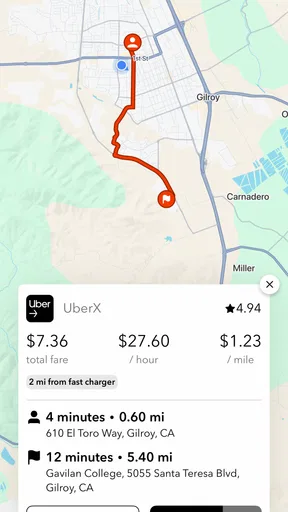
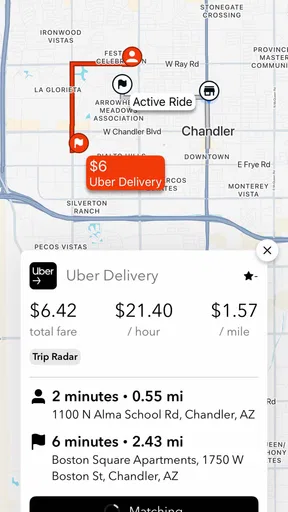
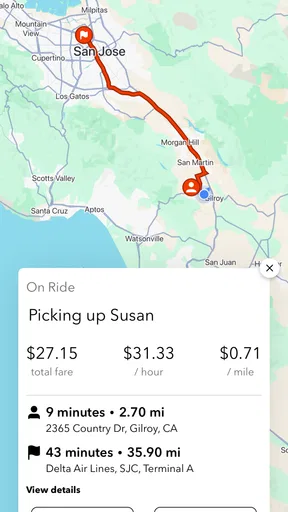
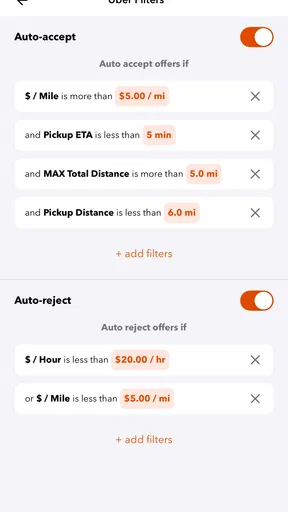
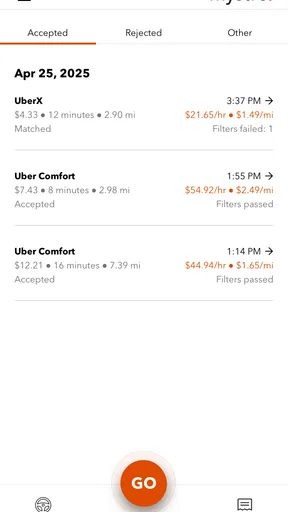
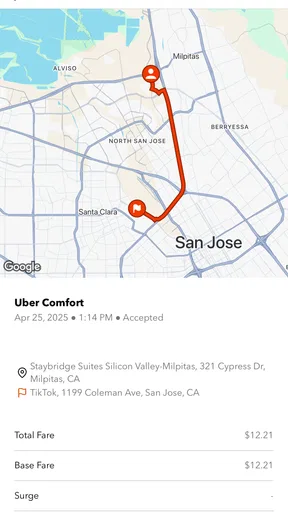
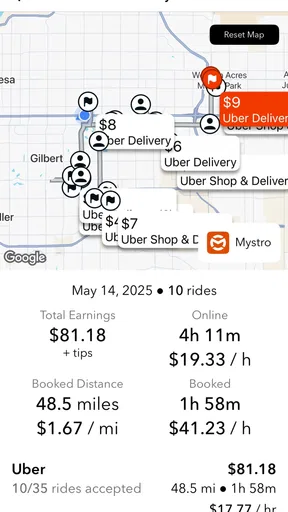
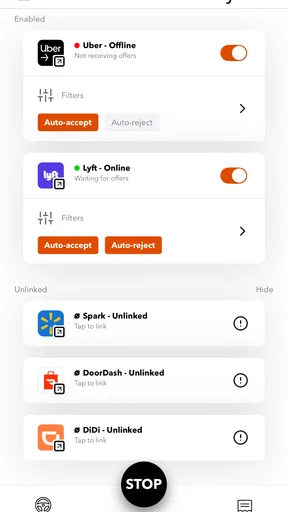
Our Review of Mystro Driver: Drive & Deliver
 Analysis by Appyee
I tried Mystro Driver as a work-focused Android app for people who drive with services such as Uber, Lyft, and DoorDash, and my first impression was that it is best understood as a control layer for a busy phone rather than another delivery or rideshare marketplace. Its purpose is to make switching between supported driver apps less awkward, so I could spend less time jumping through screens and more time deciding which request actually suited my route, schedule, and earnings goals.
That distinction matters. Mystro Driver does not replace the individual services I use to accept trips or deliveries. Instead, it sits alongside them and tries to make a multi-app routine easier to manage. In my experience, the value appears when I already work with more than one platform and have developed a clear method for comparing offers. If I only use one service, the app adds much less to my day.
How I built a practical daily workflow
My baseline routine was deliberately simple. Before starting, I opened the services I planned to use, checked that I was signed in, and then treated Mystro Driver as the place to manage the switching process. I did not expect it to make a weak offer profitable or remove the need to read the details of every ride and delivery. Its role is reducing the friction between apps, not replacing judgment.
A realistic example is an evening shift after work. I might begin with one rideshare service active, notice that requests are slow, and want to check another platform without repeatedly losing my place. With Mystro Driver in the workflow, the useful habit is to establish which service should receive attention first, decide what kinds of requests I am willing to take, and use the switching tools consistently instead of tapping randomly between applications.
The biggest benefit is mental organization. When several driver apps compete for attention, the phone can become a stream of alerts, maps, confirmation screens, and backtracking. A switching assistant can make that process feel more deliberate. I still had to verify pickup areas, destination direction, estimated effort, and whether accepting a request made sense. Mystro Driver helped with the transition between services, but it did not turn those decisions into automatic good choices.
This is also why I would not recommend starting with every available service at once. A new driver is better off learning one platform’s acceptance, navigation, and completion flow first. Once that routine feels familiar, adding Mystro Driver can make sense because the app is easier to appreciate when the user already knows what information matters on each service.
The app is free to install, which lowers the barrier to testing it. It also carries an Everyone content rating, so its presentation is not aimed at a restricted audience. However, free access should not be confused with a guarantee that every useful capability will remain cost-free. The app includes in-app purchases ranging from $4.99 to $139.99 per item, so I would review the available options carefully before treating it as a permanent part of a driving business.
What I checked before relying on it
My first practical check was whether the switching routine felt predictable. A tool like this is only helpful if I know what will happen when another request appears, when I am already navigating, or when I return to a previous service. I would not begin a shift by experimenting in a busy downtown area. A quiet test period is safer, because it lets me see how the workflow behaves without making a passenger or customer wait.
I also kept the individual driver apps available and familiar. Mystro Driver is not a substitute for knowing where to confirm a pickup, start navigation, contact a customer, or finish an order. If a switching tool ever leaves me unsure which screen is authoritative, I return to the original service and complete the task there. That extra caution is worthwhile because a few seconds saved are not worth a missed pickup or an incorrectly completed delivery.
Another useful habit is separating “checking” from “committing.” I can look at opportunities across services, but I should not accept overlapping work that I cannot complete responsibly. The temptation of multi-app driving is to treat every alert as an opportunity. In reality, the best workflow is selective: compare, choose, then stop looking elsewhere until the current job is under control.
Settings and habits that make the difference
The most important settings are the ones that match my actual working style, not the ones that promise the most automation. I would start by reviewing which driver services are connected, how switching is triggered, and what happens when I am already engaged with a ride or delivery. The exact choices available can vary with the current app version and device, so I prefer testing each change rather than assuming the default is ideal.
The current version is v2026.8.6, and the app supports Android 7.0 or later. That broad Android compatibility is convenient for drivers who keep an older phone as a work device, but compatibility alone does not tell me how smoothly a particular phone will handle several active apps. Before a long shift, I would test the phone with navigation, mobile data, charging, and the driver services running together.
I pay special attention to notification behavior. If alerts from multiple services arrive at once, I need a clear personal rule for what gets attention first. Some drivers may prefer to focus on one service for a block of time, while others may want a more active comparison. Mystro Driver is more useful when the notification setup supports that rule instead of encouraging constant checking.
I also recommend reviewing any automatic switching choices with caution. Automation can be helpful when the situation is repetitive, but it can be inconvenient when a driver is already committed to a passenger, heading toward a pickup, or handling a delivery with a narrow time window. My approach is to use the least aggressive setup that still saves meaningful taps. That gives me a safety margin when conditions change.
One non-obvious trade-off is that convenience can hide attention costs. Switching faster may lead me to inspect more offers, not fewer. If I find myself staring at the phone at every stop, the feature is working against the larger goal. I would set a simple limit: check during safe pauses, make a decision, and put the phone back into its navigation role.
Another worthwhile check is the app’s purchase structure. Since the app is free but offers paid items, I would identify which parts are essential to my workflow before paying for anything. A subscription or upgrade only makes financial sense if it saves enough time or reduces enough hassle during my normal schedule. Someone who drives occasionally may find the free experience sufficient, while a full-time multi-platform driver may evaluate the paid options differently.
Repeatable patterns for faster shifts
Experienced use is less about tapping quickly and more about reducing decisions. I found it helpful to create a repeatable start-of-shift sequence: confirm accounts, check the phone’s connection and battery plan, open the services I expect to use, and then begin with one clear switching method. Repeating that sequence prevents the first few minutes from becoming a troubleshooting session.
I would also divide the day into operating modes. During a passenger trip, the priority is completing that trip safely and following the active navigation. During a waiting period, I can compare opportunities. During a delivery run, I should protect the delivery sequence rather than chase a new request. Mystro Driver fits best when I use it differently in each mode instead of leaving every option active all the time.
A useful pattern is to make one service the temporary “home base.” I return there after checking another platform, rather than bouncing among several screens. This reduces the chance of forgetting which request I accepted or where the next action belongs. The app can support the switching, but the home-base rule comes from me, and it is what keeps the workflow understandable.
I also learned not to confuse a faster app transition with a faster shift. The real gain comes from fewer repeated logins, fewer unnecessary screen changes, and less uncertainty about where to look next. If switching takes me to a screen that still requires several manual checks, I should count the whole process, not just the first tap. That is a better way to judge whether Mystro Driver is genuinely helping.
For delivery work, I would use a stricter filter than I might use for short rides. A delivery can involve restaurant waiting, parking, apartment access, and a return route that is not obvious from the first screen. Mystro Driver may help me move between services, but it cannot remove those physical delays. The practical lesson is to compare the complete job, not merely the displayed payout or the speed of receiving it.
For rideshare work, direction matters as much as immediate availability. If I am trying to finish near home or move toward a preferred area, I should decide that before accepting. A switching tool can expose more choices, but more choices are only useful when I have a destination strategy. Otherwise, I may spend the evening accepting work that looks attractive individually but leaves me in an inconvenient location.
The app is particularly suitable for drivers who already have a repeatable acceptance policy. For example, I might decline jobs that take me far from my planned area, avoid overlapping commitments, and pause one service whenever I accept a time-sensitive request. Mystro Driver becomes a practical shortcut around that policy. Without the policy, it risks becoming a faster way to make inconsistent decisions.
Where the convenience reaches its limits
My main reservation is that multi-app management increases complexity even when the interface reduces some of the tapping. Every additional service brings its own rules, maps, customer messages, and completion steps. Mystro Driver can streamline movement between them, but I still need to understand each service independently. Drivers looking for a single all-in-one dashboard may find that the underlying work remains more fragmented than expected.
There is also a safety limit that should not be ignored. No switching feature is worth handling the phone while driving. I would configure the workflow before moving, use a proper phone mount, and make changes only when parked safely. This is not a minor preference: the app’s usefulness depends on fitting into responsible driving habits, not encouraging more interaction with the screen.
Reliability is another practical concern. A driver may encounter weak data coverage, an app that signs out, a delayed notification, or a service that changes its own interface. I would always keep a fallback routine: use the original driver app directly, confirm the current job there, and avoid accepting anything I cannot clearly track. Mystro Driver should make my process more resilient, not become the only point of control.
Its store presence shows an average rating of 3.7 from around 5.8 thousand ratings, with roughly 353 written reviews. I read that as a sign to keep expectations measured. The concept is useful, but the experience of switching apps can depend heavily on the phone, the driver services involved, and personal settings. This is the kind of productivity tool I would test in my own routine rather than judge solely by its premise.
The developer is Mystro Driver, and the app has passed 100 thousand installs. That gives it a meaningful user base among people exploring this style of work, but popularity does not remove the need for a personal trial. A driver who uses only one platform, rarely works more than a few hours, or dislikes changing established routines may gain little from it.
I would also skip it if my priority is detailed income accounting, route analysis, or long-term business reporting. Mystro Driver’s appeal is the switching workflow. A dedicated mileage tracker, spreadsheet, tax tool, or the reporting features inside each driver service may be a better choice for those jobs. Trying to make one app cover all of them would create the wrong expectations.
Conversely, it is a stronger fit for someone who regularly alternates between Uber, Lyft, and DoorDash and feels that the repeated app changes are the most irritating part of the shift. The benefit is greatest when those services are already part of a disciplined routine. In that situation, even a modest reduction in friction can make the phone feel less chaotic.
My verdict after treating it as a work tool
Mystro Driver is most valuable as a switching assistant, not as a magic earnings app. I like the idea because it addresses a very specific problem: drivers who divide their attention among several services need a cleaner way to move between them. The app’s free entry point makes it reasonable to test, while the available paid items mean I would examine the cost against my actual driving frequency before upgrading.
My recommendation is to begin with a quiet trial, one or two services, and a written rule for accepting work. Check the notification and switching behavior, see how it fits beside navigation, and keep the original apps ready as a fallback. After that, add complexity only when the previous step feels reliable. This approach reveals whether the app is saving time or merely adding another layer to manage.
I would recommend it to regular multi-platform drivers who are comfortable making their own decisions and want fewer repetitive transitions. I would not recommend it as a first app for a new driver, a replacement for careful route judgment, or a reason to accept overlapping jobs. Its strengths appear when the user brings a clear system and uses the app to support that system.
In the end, my opinion is positive but practical. Mystro Driver can make a rideshare and delivery routine more organized, especially when switching between services has become a daily annoyance. The best results come from combining its controls with safe phone habits, a consistent home-base service, and a firm rule about when to compare offers. If that sounds like the way you already work, it is worth trying; if not, the individual driver apps may remain the simpler and better option.
Verdict
Strengths of Mystro Driver: Drive & Deliver
- Combines rideshare and delivery requests in one driver app.
- Helps reduce downtime by matching nearby opportunities.
- Offers controls to filter platforms, zones, and preferred trip types.
- Can simplify switching between driving and delivery services.
- Useful for comparing demand across multiple gig apps.
Limitations of Mystro Driver: Drive & Deliver
- Requires access to several supported driver accounts to be most useful.
- Compatibility may vary by platform, region, or driver account.
- Automated app switching can occasionally feel confusing during busy periods.
- Battery and mobile data use may increase during extended driving sessions.
- Drivers remain responsible for accepting trips and following each platform’s rules.
Similar Picks in This Category
View All
Google Calendar
Google LLC4.6

Google Drive
Google LLC4.3

Google Assistant
Google LLC3.9

Microsoft OneDrive
Microsoft Corporation4.6

Samsung Calendar
Samsung Electronics Co., Ltd.4.1

Microsoft OneNote: Save Notes
Microsoft Corporation4.6
Frequently Asked Questions
What is Mystro Driver: Drive & Deliver, and who is it designed for?
Mystro Driver: Drive & Deliver is an app designed for drivers who work with multiple rideshare and delivery platforms. It helps organize incoming requests, manage active trips, and switch between supported services from one place. It may be useful for professional drivers who want a more streamlined workflow, although the available features and supported platforms can vary by location and device.
Which rideshare and delivery services are compatible with Mystro Driver?
Compatibility depends on your country, city, operating system, and the services currently supported by Mystro. The app is generally intended to work with popular rideshare and delivery platforms, but not every service is available everywhere. Before downloading, check the official Mystro listing and in-app compatibility information to confirm that the platforms you use are supported in your area.
Can Mystro Driver automatically accept rides or delivery orders?
Mystro may provide automation tools that help drivers manage requests according to selected preferences, such as destination, estimated earnings, or trip type. However, the exact automation options can differ by platform and region, and drivers remain responsible for reviewing settings and complying with each service’s terms. Carefully test the app before relying on automatic actions during busy driving periods.
Is Mystro Driver safe and legal to use while driving?
Mystro is intended to reduce the need to switch between multiple driver apps, but it should never encourage unsafe phone use. Drivers should configure preferences before starting a shift, use a secure phone mount, and follow local laws regarding mobile devices. Whether automation is permitted also depends on the policies of the rideshare or delivery platforms you use, so review their rules before enabling advanced features.
Does Mystro Driver cost money, and are there any subscription requirements?
Mystro’s pricing and available features may change over time, and some tools may require a subscription, trial, or in-app purchase. The free version, if offered, may include limitations compared with paid plans. Check the current Google Play or App Store listing and the pricing page before signing up, paying particular attention to trial periods, automatic renewal, cancellation instructions, and refund conditions.
